Google Analytics consultant: GA4 and tracking audit
Know which of your numbers to trust, and how to fix the rest.
For businesses whose GA4, CRM and ad platforms each tell a different story. I check your tracking end to end against what actually landed in your CRM or store, then give you a written report with every fix ranked.
What does a Google Analytics consultant do?
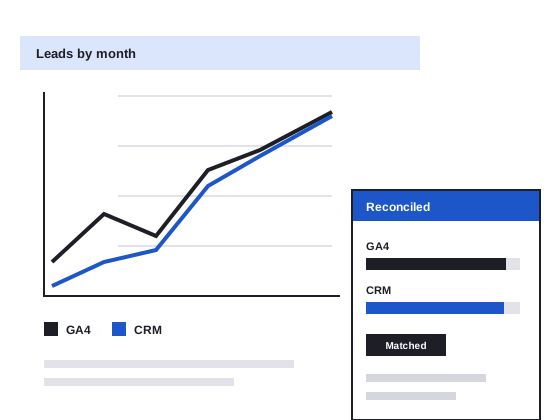
A Google Analytics consultant makes sure your tracking records what really happens on your site, so the reports can be trusted. My GA4 and tracking audit checks GA4, Tag Manager, consent and conversion tracking, reconciles the numbers against your CRM or store, and gives you a written report with every fix ranked by impact.
What the audit covers
The whole path, from the first click to the enquiry or sale in your CRM. Tracking a form submission is easy. Matching it to a qualified lead three weeks later is where most audits stop.
Check it yourself
Four checks you can run this week
None of these need a consultant. They do need someone with access to GA4 and your CRM or store.
- Reconcile one month. Put last month's GA4 key events next to the enquiries or orders in your CRM or store for the same dates. A small gap is normal. A big one, in either direction, means something is broken.
- Reload the thank-you page. Submit your own form, then refresh the confirmation page. If GA4 counts two conversions, so does every report built on it.
- Watch what fires. Install Google Tag Assistant, browse your site like a customer and watch which tags fire, and how often.
- Follow a sale across domains. If booking, payment or checkout happens on another domain, run a test through and check GA4 keeps it as one visit, not a new one from “referral” or “direct”.
If two or more of these surprise you, the audit finds out why, and what it's costing you.
How pricing works
Nothing starts until you've agreed the price.
- A free 20-minute callTell me what's going on. I'll ask about your tracking, the systems around it and what you need.
- A ballpark by email, when the scope is clearFor most GA4 and Tag Manager setups I can send a ballpark after the call. It covers the end-to-end check, the reconciliation against your CRM or store, a written report, a ranked fix list and a walkthrough call.
- Paid discovery, when it isn'tSeveral GA4 properties, ad platform attribution, server-side tagging or custom integrations start with a paid 2-hour discovery session. It's credited against the audit if you go ahead within 60 days.
How it works
- Day 1A 20-minute callFree. What you track, where the numbers disagree, and whether this audit fits.
- Within 2 business daysScope and accessScope and price in writing. You give me access to GA4 and Tag Manager, plus your CRM or store figures for the same period.
- 7 to 10 business daysThe auditEvery key event tested, the tags reviewed and the numbers reconciled. I look without changing anything.
- DeliveryReport and callThe findings and a ranked fix list, walked through on a call. Then you decide who fixes what.
Case study · Large residential home builder
As Head of Digital at a large residential home builder, I owned every connection between the website and Salesforce: campaign tracking, lead scoring and the forms feeding the CRM. So I check tracking the way the business uses it, from the first click to a qualified lead.
Read the case studyCommon questions
Why doesn't my GA4 data match my CRM or Shopify?
Some gap is normal: people who decline cookies, ad blockers and browser privacy settings all mean GA4 sees less than your CRM or store. A big gap, in either direction, usually means duplicate or missing events, broken cross-domain tracking or a conversion firing on the wrong page. The audit measures the gap and finds which of those is causing it. More in GA4 not matching your CRM? How to check.
How much does a GA4 audit cost?
It depends on how many properties and tags you run and what they connect to. After a free 20-minute call I can usually send a ballpark by email. Several properties, ad platform attribution, server-side tagging or custom integrations start with a paid discovery session, credited against the audit.
How long does the audit take?
7 to 10 business days from when the deposit is paid and I have access. You get the scope in writing within 2 business days of the first call, and the walkthrough call follows the report.
Do I need server-side tracking or the Meta Conversions API?
Not until your basic tracking is clean and your ad spend justifies it. Both send conversion data from a server instead of relying only on the browser, which can recover some of what ad blockers and privacy settings hide. But if your tags already fire twice or miss events, a server just moves the same errors somewhere more expensive. The audit tells you whether it's worth it for you. More in server-side tracking, explained.
What access do you need?
Administrator access to GA4 and read access to Tag Manager, plus your CRM or store figures for the same period, as an export if that's easier. I look without changing anything, and you can remove my access once the report is in.
Is this part of the Website Health Check?
The Website Health Check includes a lighter analytics check as one of seven areas. This audit goes further: every key event tested, the tags reviewed one by one and the numbers reconciled against your CRM or store. If tracking is your main worry, start here.
Can you fix the tracking after the audit?
Yes, if you want me to: on prepaid hours or as a fixed-price project, quoted once you've seen the findings. That includes Tag Manager fixes and a Looker Studio dashboard built around the numbers you actually use. Or your developer or agency can work from the report: it's written so anyone can act on it.

When did your GA4 last match your CRM?
Book a 20-minute call and tell me where the numbers disagree. No pitch, no obligation.
Book a 20-minute call or send me a message. I answer both myself.